Customization of Report
Jump to navigation
Jump to search




Contents
Introduction
In SQL Account/Payroll, 95% of the reports format are able to customize. There is 3 types of report format, each of the report format do have pros and cons.
- 01. Report Builder
- 02. Fast Report
- 03. XML Report
Report Builder
Case 1 - Combine FromDocNo in 1 Line Text (.rtm)
System will get document detail FromDocNo data combine in 1 line text display at report header instead of follow item.
Module : Sales Invoice
SQL Account version: 783 or above
Updated on : 28/01/2020

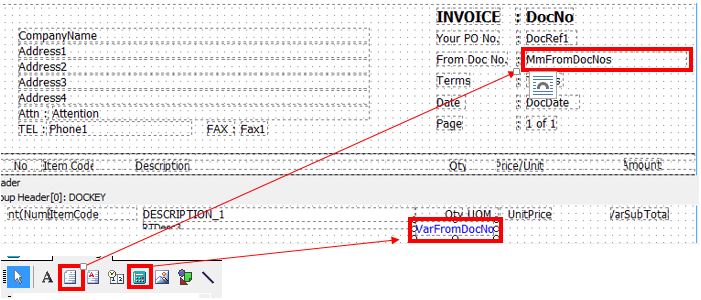
- 01. Select Memo and place the field any position at report header
- 02. Select Variable and place the field any position at report detail

- 03. Select the Memo field under Identity | UserName change to MmFromDocNos

- 04. Select the Variable field under Identity | UserName change to VarFromDocNo

- 05. Go to Calc | Right the blank space under Module View section | Select Events | Detail | BeforeGenerate
- 06. Paste below script
| BeforeGenerate Script |
|---|
begin
  if Detail.Count = 1 then
    VarFromDocNo.Value := plSQL_0.GetFieldValue('FromDocNo') else
    VarFromDocNo.Value := VarFromDocNo.Value + ', ' + plSQL_0.GetFieldValue('FromDocNo');
    MmFromDocNos.Lines.Text := VarFromDocNo.Value;
end; |
- 07. Save

- - Unable to remove duplicates value or blank value
- - Can convert report to Fast Report
- - Unable to remove duplicates value or blank value

Case 2 - Coming Soon
Fast Report
Case 1 - Combine FromDocNo in 1 Line Text (.fr3)
System will get document detail FromDocNo data combine in 1 line text display at report header instead of follow item.
Module : Sales Invoice
SQL Account version: 783 or above
Updated on : 23/04/2020

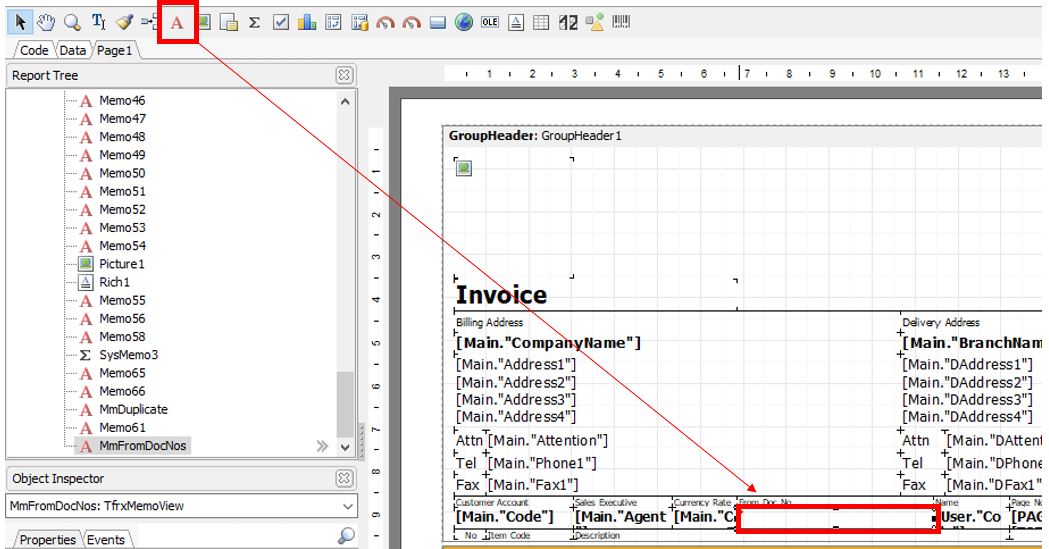
- 01. Select Text Object and place the field any position at report header

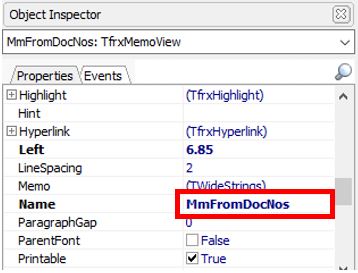
- 02. Change name to MmFromDocNos under Object Inspector

- 03. Under Object Inspector select the Events tab | OnBeforePrint | double click the empty field

- 04. Replace the script to below script
| OnBeforePrint Script |
|---|
procedure MmFromDocNosOnBeforePrint(Sender: TfrxComponent);
var SL: TStringList;
    D : TfrxDataSet;
begin
  SL := TStringList.Create;
  SL.Delimiter := ';';
  SL.Sorted := True;
  SL.Duplicates := dupIgnore;
  D := Report.GetDataSet('Document_Detail');
  try
   D.First;
   While not D.Eof do begin
    if <Document_Detail."FromDocNo"> <> '' then
      SL.Add(<Document_Detail."FromDocNo">);
      D.Next;
   end;
  finally
  end;
  MmFromDocNos.Text := SL.DelimitedText;
  SL.Free;
end; |
- 05. Save
